Thursday, July 12, 2012

Google Panda Update 3.9 on 12th July 2012


Google Panda Update 3.9

This would be version 3.9 and happening only a little over 2 weeks after the last update, Google Panda 3.8.

There are SEOs and webmasters claiming recoveries from previous Panda damage and other webmasters claiming major drops in their rankings. Because some webmasters who were hit by Panda are claiming recoveries, this seems to be a Panda related update and not a Penguin update.

To be honest, I am not sure if this is indeed a real update. There is a nice number of posts in the forums but not typical levels of a Panda or Penguin refresh.

I will reach out to Google for a comment and update this post when I hear back.

Past Panda Updates:

Update: Google said there was no specific update.

Tuesday, July 10, 2012

Useful SEO Mozilla Firefox Add-ons


Firefox SEO Add-ons


Yes, I know there are much more great FireFox plugins but I am sharing only those I am using myself and find really useful.


Useful SEO Mozilla Firefox Add-ons


Firefox SEO Add-ons


Yes, I know there are much more great FireFox plugins but I am sharing only those I am using myself and find really useful.

Monday, July 9, 2012

Google Local Listing Optimization Tips


10 Way to Improve your Gooogle Local Listing

What?

Ranking locally is much more critical with the evolvement of local listings across the web such as Google Places, Bing BBP, Yahoo local and the various social media channels. Google Places seems to consistently drive more traffic than any other local channel, sometimes upwards of 40% share of referring traffic for many of our clients.

Why?

Google has 65% market share at the moment, making Google Places the most important local listing to focus your attention on. This should be followed by Bing & Yahoo.

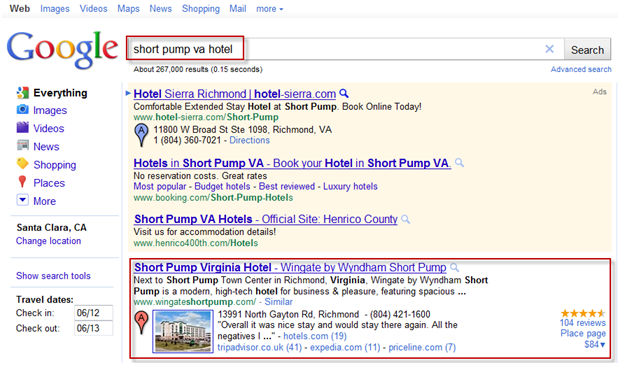
In October, Google updated their SERPs to showcase local listings alongside your organic result making your local listing that much more important. It’s now absolutely crucial to have your local listing 100% optimized and in sync with your on page/off page website strategy as well.

Google Places Listing

How?

So what can you do to improve your chances of ranking well locally? Below are the top 10 things you can do to improve your chances of ranking high and converting traffic from your Google local listings.
  1. On-page optimization: Use the correct geo-location in all on-page optimization. Do not use the geo-location that you would like to rank for. For example, if you are located in Sunnyvale, you should use “Sunnyvale hotel” and not “Santa Clara hotel”. Its fine to use “Hotel near Santa Clara” but to state “Santa Clara Hotel” would not be accurate or helpful to your local strategy.
  2. Local Submissions: Submit your website/business information to local data providers such as Acxiom, InfoUsa and Localeze. These data providers will feed your business information across the web to other business information channels, helping you build credibility across the web. In the long run, local submissions help you gain more local relevance and trust with the search engines and public users.  It is critical to ensure your business information on your website is accurate and consistent across all of these sources. Incorrect business information will result in distrust from search engines and the public, and will negatively impact your local ranking and conversion.
  3. Claim Google Places listings:  The ability to optimize your listing is only possible once it is claimed and verified by you, the owner. This is a great way for you to control the information about your business.
  4. Optimize Your Local Listing Account to 100%:  Ensure each of the below buckets are optimized and completed.
    • Correct business information: Ensure name, address, and phone number  (NAP) on listing & website is correct.
    • Categories: this is how Google knows what type of business you are.
    • Hours of Operation
    • Photos
    • Videos
    • Additional Details
    • Update Place Page: Promote specials or events with specific calls to action
    • Google Reviews Management Response: Respond to Google reviews via your Google Places account.
  5. Encourage Online Reviews:  Online reviews play into the local ranking algorithm. It’s not so much about the amount of reviews your hotel receives, but the quality of your reviews.  Research which third party review sites are important to your industry/location and target those first. Don’t forget to encourage online reviews directly via your website as well. Google can now index your website reviews and pull them into your local listing. The more reviews, the better!
  6. Respond to reviews:  Doing so can help build/improve your hotel’s online reputation as it shows that management places great importance on customer service and satisfaction. Not only will this result in higher trust, but it can also lead to return visitors/guests.
  7. Build citations from credible/authoritative sources:  Online citations for your business are the equivalent to online referrals for your website.  Citations are not links necessarily, but can be simple mentions of your NAP.  The more credible online citation sources you accumulate, the more likely it is that your Google local listing will rank well.
  8. Claim Hyperlocal listings:   It’s important to claim your Facebook Places, Foursquare, and Gowalla listings. Hyperlocal listings give you local credibility, allow you to gain local relevance, and help you build a stronger local community following.
  9. Ensure you cross-optimize and apply what works on your site to your Places Local Listing:
    • Promote successful packages
    • Promote most viewed/converting pages
    • Promote Social Media channels
  10. Google Boost: Participate in Google Boost to get some early traction to your local listing.  You cannot control which keywords you appear for but it’s a great way to gain some additional exposure.

Thursday, July 5, 2012

You can get your social media profile weight still if its "no follow"

How does nofollow work with the Social Graph API (rel="nofollow me")?

If you host user profiles and allow users to link to other profiles on the web, we encourage you to mark those links with the rel="me" microformat so that they can be made available through the Social Graph API. For example:

<a href="http://blog.example.com" rel="me">My blog</a>

However, because these links are user-generated and may sometimes point to untrusted pages, we recommend that these links be marked with nofollow. For example:

<a href="http://blog.example.com" rel="me nofollow">My blog</a>

With rel="me nofollow", Google will continue to treat the rel="nofollow" as expected for search purposes, such as not transferring PageRank. However, for the Social Graph API, we will count the rel="me" link even when included with a nofollow.

If you are able to verify ownership of a link using an identity technology such as OpenID or OAuth, however, you may choose to remove the nofollow link.

To prevent crawling of a rel="me nofollow" URL, you can use robots.txt. Standard robots.txt exclusion rules are respected by both Googlebot and the Social Graph API.

However, you can be superstitious about the following best practice in using these relationship attribute:

rel="me"

Google now uses reciprocal link juice dumping factor. So, reciprocal links don't get the usual link juice for SEO. So, many people think that using rel="me" can save them, if they link from multiple sites that they own. This tag can be used for similar and related contents also.

rel="friend"

You can define a link as friend, which might have separate influence on the link when search engines plans to utilize the relationship. Without login, if you go to your public profile in Facebook, then you will see that your friends' profiles are linked with the rel="friend" tag. If your content is dependent on the contents of other links (e.g. if you are reviewing a post), then you can use the tag.

rel="external"

This tells the search engine that the link is not a "friend" nor "me". i.e. just a typical stranger. So, this might have different value in the eye of search engine. But, let me remind you that this is still a superstition.

Monday, July 2, 2012

What is Pruning Links


Pruning Links

Once you have identified if bad links are pointing at your site, you need to start working to address it.
link pruningIf you have 10,000 or more links to your site, this can seem like an insurmountable task – particularly if the people who acquired the bad links are no longer around to ask about what they did.
Here are some things you can do to simplify the cleanup process.

Categorize Your Links

Start by pulling the link data. At a minimum, pull it from Google Webmaster Tools, because that is what Google is reporting.
If you can, it is also great to get link data from Open Site Explorer and Majestic SEO. Integrate all this data into one master list.
Combining your data (and de-duping the results) gives you the largest possible list of links, as individual link data sources can only provide a sampling of the links to your site.
Once you have your master list, it's time to start simplifying the task a bit.

1. Sort Your Links by the Linking URL

Group the links by domain. If a domain links to you from 834 pages, just check 1-3 at most – chances are that if the links are bad on any of the pages, it's bad on all of them.
This by itself is a huge simplification of the task. For example, look at these example link counts:

The blog has 201,048 links from 778 domains. So instead of checking more than 200,000 pages, you only need to check 778 domains. The workload seems a lot lighter already, doesn't it?

2. Separate Links From Blogs

This is hard to do without doing a little programming, but the required programming is easy.
Look for URLs that have "blog" as part of the URL, or load the pages and see if you can find the string "Wordpress", "Moveable Type" and other such blog platforms on the page. This won't give you a complete list of blogs, but it will identify a lot of them for you.
You will need to look at these posts, but you can give the person doing the work simplified guidelines, such as telling them to look for:
  • Low quality posts.
  • In context links with rich anchor text.
  • Multiple links per post.
Also, if 1,100 blogs link to your site, and you look at 100 of them and see significant problems, you know you need to check them all (unfortunately!).
But, if you look at 200 or more and they are all clean, you might start to think you don't need to look at the rest. To be conservative, if you look at half of them, and they are all clean, chances are there was no bad blog campaign underway, and you can skip the rest and focus on looking at other problems.

3. Look for Multiple Links Per Page

This is another hint of a possible problem. Not definitive, of course.
For example, the other a guest post someone did on Forbes had six links to the site of the author, including rich anchor text links in the body of the post. It just looked "off."
link-pruning-multilink-pages
People who buy links tend to be a bit greedy. To them, one rich link anchor text link is good, but several links are great – they want to get their money's worth.
The upside of this greed is it can make it easier for you to recognize potential bad links.
Tracking down pages with multiple links takes little bit of programming, but it isn't too hard.

4. Look for Pages That Link to You With Rich Anchor Text

This is again not a definitive flag, but can focus where you look for trouble.
Consider the inverse rule too – if the only links on the page to you use your URL or business name (assuming that these aren't keyword packed), then chances are that the page in question isn't a problem.
Focus your energy on pages that smell like trouble.

Sunday, July 1, 2012

How to Create Robots.txt and Use of Wildcard and Dollar patters Match


How to Create Robots.txt


The simplest robots.txt file uses two rules:
  • User-agent: the robot the following rule applies to
  • Disallow: the URL you want to block
These two lines are considered a single entry in the file. You can include as many entries as you want. You can include multiple Disallow lines and multiple user-agents in one entry.
Each section in the robots.txt file is separate and does not build upon previous sections. For example:
User-agent: *  Disallow: /folder1/    User-Agent: Googlebot  Disallow: /folder2/  
In this example only the URLs matching /folder2/ would be disallowed for Googlebot.

User-agents and bots

A user-agent is a specific search engine robot. The Web Robots Database lists many common bots. You can set an entry to apply to a specific bot (by listing the name) or you can set it to apply to all bots (by listing an asterisk). An entry that applies to all bots looks like this:
User-agent: *  
Google uses several different bots (user-agents). The bot we use for our web search is Googlebot. Our other bots like Googlebot-Mobile and Googlebot-Image follow rules you set up for Googlebot, but you can set up specific rules for these specific bots as well.

Blocking user-agents

The Disallow line lists the pages you want to block. You can list a specific URL or a pattern. The entry should begin with a forward slash (/).
  • To block the entire site, use a forward slash.
    Disallow: /
  • To block a directory and everything in it, follow the directory name with a forward slash.
    Disallow: /junk-directory/
  • To block a page, list the page.
    Disallow: /private_file.html
  • To remove a specific image from Google Images, add the following:
    User-agent: Googlebot-Image  Disallow: /images/dogs.jpg 
  • To remove all images on your site from Google Images:
    User-agent: Googlebot-Image  Disallow: / 
  • To block files of a specific file type (for example, .gif), use the following:
    User-agent: Googlebot  Disallow: /*.gif$
  • To prevent pages on your site from being crawled, while still displaying AdSense ads on those pages, disallow all bots other than Mediapartners-Google. This keeps the pages from appearing in search results, but allows the Mediapartners-Google robot to analyze the pages to determine the ads to show. The Mediapartners-Google robot doesn't share pages with the other Google user-agents. For example:
    User-agent: *  Disallow: /    User-agent: Mediapartners-Google  Allow: /
Note that directives are case-sensitive. For instance, Disallow: /junk_file.asp would block http://www.example.com/junk_file.asp, but would allow http://www.example.com/Junk_file.asp. Googlebot will ignore white-space (in particular empty lines)and unknown directives in the robots.txt.
Googlebot supports submission of Sitemap files through the robots.txt file.

Pattern matching ( Wildcard and Dollar)

Googlebot (but not all search engines) respects some pattern matching.
  • To match a sequence of characters, use an asterisk (*). For instance, to block access to all subdirectories that begin with private:
    User-agent: Googlebot  Disallow: /private*/
  • To block access to all URLs that include a question mark (?) (more specifically, any URL that begins with your domain name, followed by any string, followed by a question mark, followed by any string):
    User-agent: Googlebot  Disallow: /*?
  • To specify matching the end of a URL, use $. For instance, to block any URLs that end with .xls:
    User-agent: Googlebot   Disallow: /*.xls$
    You can use this pattern matching in combination with the Allow directive. For instance, if a ? indicates a session ID, you may want to exclude all URLs that contain them to ensure Googlebot doesn't crawl duplicate pages. But URLs that end with a ? may be the version of the page that you do want included. For this situation, you can set your robots.txt file as follows:
    User-agent: *  Allow: /*?$  Disallow: /*?
    The Disallow: / *? directive will block any URL that includes a ? (more specifically, it will block any URL that begins with your domain name, followed by any string, followed by a question mark, followed by any string).
    The Allow: /*?$ directive will allow any URL that ends in a ? (more specifically, it will allow any URL that begins with your domain name, followed by a string, followed by a ?, with no characters after the ?).
Save your robots.txt file by downloading the file or copying the contents to a text file and saving as robots.txt. Save the file to the highest-level directory of your site. The robots.txt file must reside in the root of the domain and must be named "robots.txt". A robots.txt file located in a subdirectory isn't valid, as bots only check for this file in the root of the domain. For instance, http://www.example.com/robots.txt is a valid location, but http://www.example.com/mysite/robots.txt is not.